

Discord announced on Tuesday a complete ground-up rebuild of its desktop Overlay feature, giving PC gamers customizable on-screen widgets to streamline streaming, communication, and performance without blocking active gameplay.
Modular Widgets Replace Clunky Full-Screen Interface
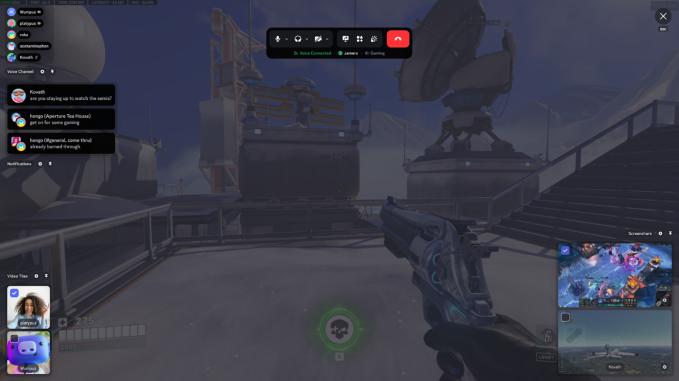
Under the platform’s legacy architecture, toggling the Overlay displayed the entire Discord desktop client directly in the center of the display. This traditional interface frequently blocked live streams and created an intrusive user experience during high-stakes gaming sessions.
The redesigned Overlay resolves these friction points by introducing standalone Discord widgets that position neatly around the edges of the screen. Gamers can now adjust audio levels, tweak video settings, and read incoming messages on the fly without pulling up the full application client. Each widget features deep customization controls, allowing players to adjust opacity, scale size, and select precise screen placements.
Picture-in-Picture and Enhanced Game Compatibility
Collaborative gaming receives a functional upgrade through a new picture-in-picture (PiP) display widget. If a friend streams gameplay simultaneously, players can monitor that live broadcast directly inside their own Overlay—a tool particularly effective for coordinated online multiplayer matches. The updated system also embeds participants’ webcam feeds during active voice chat sessions.
Beyond functional visual upgrades, Discord confirmed that the new Overlay architecture expands compatibility across a broader catalog of PC games while offering noticeably smoother overall performance.
Expanded Dark Themes and Custom Desktop Layouts
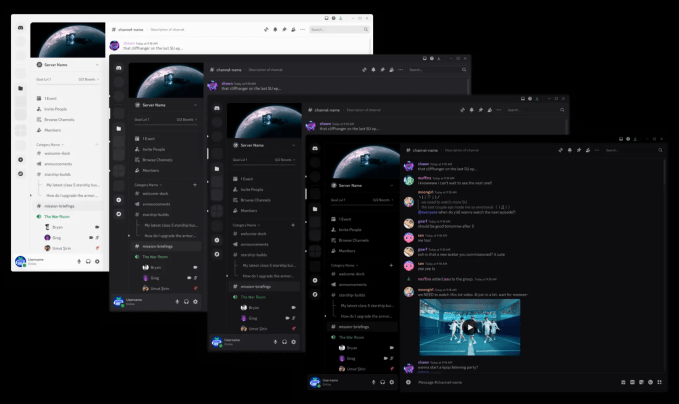
Alongside the Overlay redesign, Discord introduced visual updates to its core Desktop application. Dark mode users can now choose from additional free dark themes to switch between specific shades of black and grey, named Ash, Dark, and Onyx.
Updated UI density settings also enable users to adjust word and text spacing throughout the app interface. While geared toward power users and creators utilizing server livestreams for monetization, these quality-of-life additions provide practical utility for casual users chatting during everyday gaming sessions.










Leave a Reply